HTML5 Games
Look past the browser format to the first action
The HTML5 tag on Pokia describes a format you will see across very different browser games. It tells you little about what to expect after pressing Play. A game can ask you to steer through a three-dimensional space, aim a movement with one input, or manage a series of quick decisions. Begin with a question about the experience. Do you want to explore a place that takes time to learn, or see the consequence of a move immediately?
Take a short dive before choosing a direction
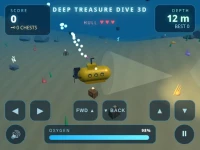
Deep Treasure Dive 3D puts you in a yellow submarine and gives you chests to look for around a reef. Depth gives you a reason to move farther away from the starting area, while the terrain can give you clues about where you have already looked. Start by learning how much your point of view changes when you turn. A landmark you can recognise from another angle can help you get your bearings without needing to memorise the entire scene.
Try locating one chest and steering toward it from a position where you can still see the area around it. That can teach you more about the controls than heading directly downward and making corrections as you go. You can stop after you have made one purposeful approach. If the movement feels comfortable and you want to learn another space, the 3D Games category is a useful place to continue.
Use the landing point to make a fast decision
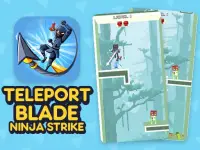
In Teleport Blade: Ninja Strike, the blade gives your character somewhere to teleport. The action can be quick, but deciding where to go is still a separate task. Look at the area around the point you are aiming for. A successful hit or throw can leave you somewhere you did not want to stand. If you keep that landing point in mind, the first few attempts can help you understand what the game expects from the aim.
Give yourself a simple target to test how the input behaves. If you are on a phone, notice whether your hand blocks the part of the screen you need to see. At a computer, check whether you can aim comfortably while watching what happens after the throw. The format label is less useful here than the controls you can actually use on the device in front of you.
Test the game you want to play
Open an individual game page and read any instructions before starting. It is worth checking the size and orientation of the play area, especially if the same site is open on a different device from the one you usually use. After one short attempt, decide whether the challenge itself appeals to you or whether you want a different kind of input. Browse 1 Player when you want another game to try at your own pace. Browse Action Games when you want a movement that gives you immediate feedback.
Choose by what you can comfortably do once the round starts.