Kids Games
Choose an activity that makes sense at a glance
The Kids tag on Pokia is a place to browse visually clear browser games with very different activities. One title might revolve around a familiar task such as making a snack. Another takes its time explaining a jump or gives you a world to move through freely. Look at what the game asks you to do and how it shows you the result. A game with a clear action and visible feedback can be easier to get into than one whose card simply looks bright or friendly.
Make one thing from start to finish
Roll Rush: Ice Cream Tycoon puts you at a rolled ice cream stand on a beach. The visible task of scraping the ice cream into rolls gives you something concrete to watch and try. Begin with one serving before looking around the rest of the stand. Watching a simple process turn into something you recognise makes it easier to see when a step is done. It can also help someone who is trying the game for the first time understand what to do on a second turn.
When playing together, one person can watch while the other tries a step and then swap. That gives each person a chance to notice something the other missed. You do not have to go far into the game to have a shared activity. Finishing one clearly defined task can be enough. If you enjoy that idea, the Cooking Games category has other titles that turn ingredients into something you can recognise.
Read the next island before jumping
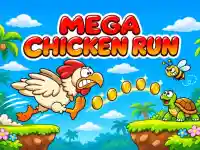
Mega Chicken Run exchanges the stand for colorful islands. The chicken runs and jumps across gaps, and coins mark extra things to pick up along the way. On a first attempt, look for the next place to land rather than every coin in sight. When you know where the character needs to go, it is easier to see when to jump. You can return for a coin later once the simplest route is familiar.
If a jump feels frustrating, take a moment to watch where it began. A small change in the starting point can make it much easier to get across. It can be useful to try one short part of a level again before deciding whether the game suits you. Being able to see what changed is more encouraging than continuing through a long stretch where the feedback is hard to read.
Check the game with the player in mind
Open the individual page to check its controls, reading level, and pace. What works well at a computer may be awkward on a touch screen. Adults choosing a game for a child can preview the game and its surroundings to see whether it fits. The tag is a way to start looking. A clear serving to finish or an island to reach gives you a more practical basis for choosing a short game together.
Let the first short activity show whether the pace feels comfortable.