Free Html5 Games For Your Website
Pick a browser game that fits the page you publish
A game on a website can be the reason someone visits or a break between the things they came to read. The difference matters when you browse Pokia's Free HTML5 Games for Your Website collection. Start with the page where the game would appear. A short activity can fit below a tutorial or a seasonal post. A game with ongoing goals can suit a page people bookmark and revisit. Try a few candidates in the browser and pay attention to the time between opening the game and understanding what to do.
Try three different openings
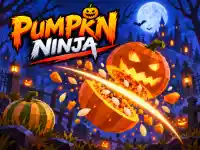
Pumpkin Ninja asks players to swipe through flying pumpkins while avoiding bombs. It gives a seasonal page an activity with an easy premise to describe in a single line. If you are building a Halloween feature, test how the swipes feel on a phone held in one hand. Check whether the game area leaves room to pause and scroll back to the rest of the page after a run.
Bump the Balls has a different rhythm. You draw a line to help two balls meet. There is room to study the starting positions before acting, so the first puzzle can give visitors time to get comfortable with the controls. Play it at the width your layout actually allows. A player needs to see where the balls are and have enough room to make a deliberate stroke. If the layout makes that awkward, a dedicated game page may suit it better than a narrow column beside an article.
Sunfield Vegetable Farm gives players a longer sequence to try. They plant and water vegetables, harvest the crops, and sell what they grow. Sample enough of the routine to see whether the activity matches how people use your site. A visitor who opens the game during a short break might stop at planting. Someone who arrives specifically to play may want time to bring a crop all the way to sale.
Check the publishing terms and test the placement
Use the links on this page to try the games. Before hosting or embedding a title yourself, confirm the current distribution terms with the publisher or distributor and obtain the approved embed or distribution link. Free play in a browser tells you what a visitor can try here. Permission to distribute the game on your own site depends on the terms for that title. Check for any placement, attribution, and advertising requirements while you decide how it belongs on the page.
Once you have an authorized placement, preview the page at the same sizes your visitors are likely to use. Check whether the first instruction is readable, whether a key press or swipe reaches the game, and whether the rest of the page is still easy to navigate. Give the game a brief label that tells people what they will do. A description such as drawing a line to guide two balls gives readers a better basis for choosing than a label that just tells them to play. Apply the same check to whichever title you shortlist from the collection.