Html Games For Your Website
Find a game for the article people came to read
A visitor looking up dessert ideas arrives with a different purpose from someone comparing platform games. When you pick a browser game from Pokia's HTML Games for Your Website tag, think about what the visitor has already been doing on your site. The game can give them a short activity that carries the same subject forward. It can also offer a change of pace after a longer read. The placement works best when the visitor can see how much attention the game asks for before opening it.
Use the action to decide which dessert game fits
Happy Food Link presents food tiles to connect. The path between matching tiles can bend up to twice, so seeing matching pictures is only the beginning. Before choosing it for an article, play long enough to see how a clear path changes your options. A page about pattern puzzles could invite readers to find a pair near an edge and see how removing it opens space. A recipe page could introduce the same title as a quick matching break, with a short explanation of the bends allowed.
In Ice Cream Sorting, you move treats between shelves and make groups of three. That is a good candidate when you want visitors to think about where to put something before selecting the next piece. The shelves give you a visual reference when you write the link label. For example, inviting readers to sort a shelf of ice creams sets a clearer expectation than simply describing a game with colorful desserts. Sample both titles if you want a single food puzzle on your page. One asks you to trace a connection through open space, and the other asks you to rearrange what is already there.
Give a longer activity a place of its own
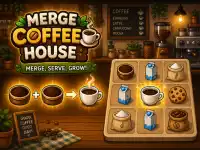
Coffee Merge House combines ingredients into treats to fill customer orders. Let someone try it long enough to finish an order when you are deciding where it belongs. That gives you a better sense of how the game fits into a visit than watching the first merge. A café themed feature may have room to introduce both the recipe or story and the game as separate activities. If most visitors are following a set of instructions, an article ending can give them a natural place to choose whether to start playing.
You can link directly to the Pokia pages to let readers play there. If the game needs to run within your own website, check the publisher's current distribution terms and use an authorized version. Preview the finished article from the perspective of someone who came for the original subject. Find the headline, read a few paragraphs, and see whether the game invitation makes sense where it appears. Then try returning to the article after playing. A clear label and an easy route back can make a small browser game feel like a considered part of the page. The right place depends on the activity and on where a visitor has time to try it.